Run your whole field crew from one app.
Time tracking, scheduling, invoicing, and safety in one place, and it keeps working even when there's no signal. Built for the trades.
Now available on iPhone & Android
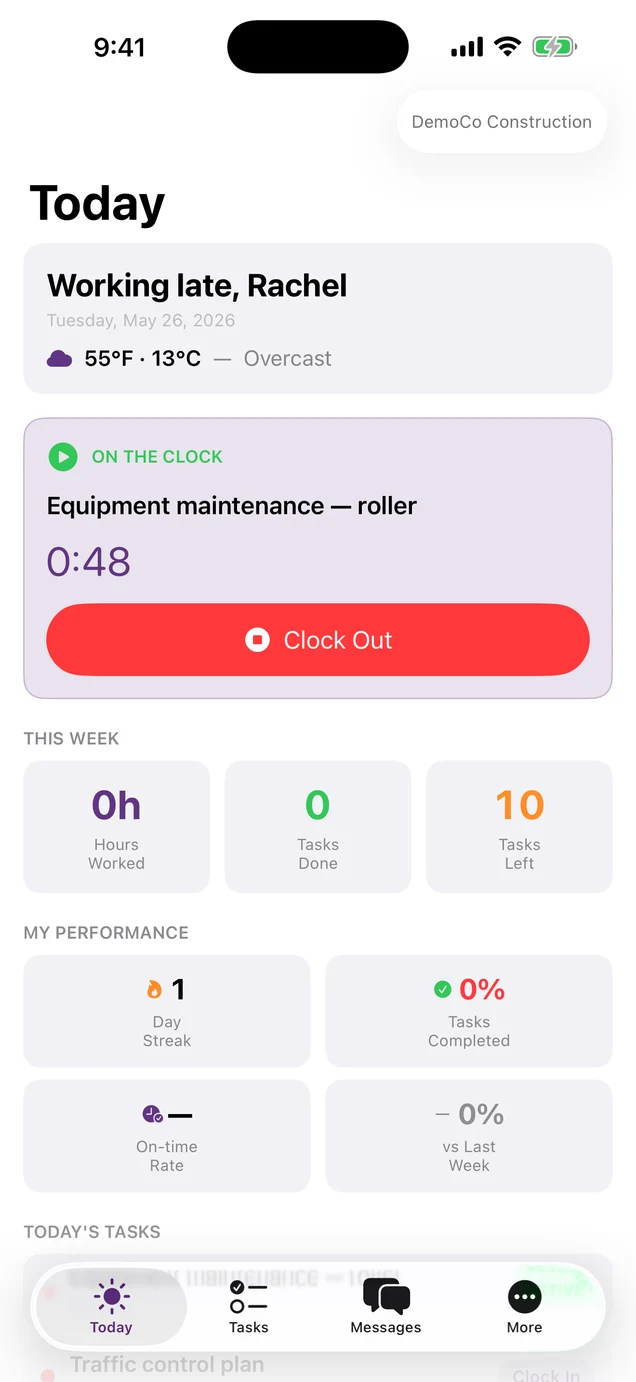
Run a tighter operation.
Here's what changes when everything your crew does lives in one place.
One app, not five
Scheduling, time, invoicing, and safety in one place, so your crew and office stop juggling tools and re-typing the same info.
The office always knows
See who's on the clock, what's done, and what's running behind, without calling the crew for an update.
Get paid faster
Turn logged field hours and materials into an invoice in a couple of taps, straight to QuickBooks.
Works where you work
Crews clock in, shoot photos, and log safety in dead zones. It syncs the moment they are back in range.
Built for the trades that keep the world running
Clock in, work, sync.
From the first tap to the synced report, the whole loop is built for crews who don't have time to fight with their software.
Clock in from anywhere
Your crew opens the app and taps in. GPS verifies the location, the timer starts, and the day begins, even with no signal.
Get the work done
Tasks, photos, signatures, notes, and breaks all captured on-device. Swipe to complete. Drag to reschedule. Built for thumbs and gloves.
Sync the moment you reconnect
Back in cell range? WorkTrac quietly streams the day to the cloud. Managers see everything live. Nothing is ever lost.
Tools that finally talk to each other.
Most field teams juggle four to five apps for scheduling, time tracking, invoicing, and communication. WorkTrac does the lot, for the crew in the field and the office running the jobs.
Work proof chain
Every clock-in and task completion is GPS-stamped, timestamped, and chained, creating a tamper-evident audit trail your insurance carrier and your customers can both trust.
- GPS verified clock-in / clock-out
- Required photos on task close-out
- Customer signature capture
- Exportable audit trail
Offline-first mobile
Your crew can clock in, complete tasks, and capture photos in basements, tunnels, and dead zones. The app syncs the moment they're back online. Nothing is ever lost.
Tasks the way crews think
List, board, calendar, and Today views. Drag-and-drop, dependencies, recurring tasks, batch operations. The same task in five different shapes for five different brains.
All in one place
One app. One bill. One team.
Tasks, time, scheduling, billing, comms, analytics, training, and safety, instead of five apps that don't talk to each other.
GPS time tracking
GPS clock-in, live timers, manager-approved timesheets.
GPS & geofencing
Auto-verify on-site presence with location history & alerts.
Invoicing
Bill from time entries. Exports to QuickBooks Online.
QuickBooks export
Export invoices and customers to QuickBooks Online. Included on Enterprise.
Shift scheduling
Weekly shift calendar, shift marketplace, break management.
Client & sub portals
Project visibility for clients, bids & waivers for subs.
Team comms
DMs, announcements, push. Replaces the group text.
Job costing & analytics
Real-time job profitability, labor cost, and team utilization.
OSHA & climate safety
Heat-index alerts, OSHA-ready incident logs, anonymous grievance channel.
Auto-translate
Tasks, comments, and announcements auto-translated for multilingual crews.
Route optimization
Sequences the day's stops in an efficient driving order.
Inventory
Track materials with check-in/out, low-stock alerts.
Training LMS
Build courses with videos, quizzes, and certifications.
Forms & estimates
Custom templates, line items, digital signatures.
One app for the crew, one dashboard for you.
The mobile app your crew runs on the job site, and the web dashboard you run the business from. Same data, the moment it syncs.
Every screen adapts to your colors and logo. Dark mode included. Native iPhone and Android apps, plus the dashboard in any browser. No install.
Built for the trades, field to office.
One app that works across construction, HVAC, plumbing, electrical, mechanic shops, landscaping, and delivery. The same task in five different shapes for five different crews.
Construction crews
GPS hours that become the invoice, blockers that hold the trade sequence, and a sub portal with bids and lien waivers.
HVAC contractors
Every unit on file with its own serial, warranty, and service history. Maintenance plans that schedule the visits and invoice on the same cycle.
Plumbing & service
Every fixture on file with its serial and warranty, one-tap SOS for crawl spaces, and maintenance plans that bill on schedule.
Electrical contractors
Every license and cert on file with its expiry, and inspection checklists with photos and a signature, filled on the phone.
Mechanic & auto shops
Tech hours that become the invoice, certs with expiry dates, and recurring safety checks with photo proof.
Landscape & grounds
Weekly routines that spawn the visits on their own, photo minimums enforced before close-out, and one-tap heat checks logged with GPS.
Distribution & delivery
Stops closed with required photos, GPS at the door, and times signed on the phone. Open shifts your drivers apply for.
Other trades
Carpentry, painting, roofing, pest control, snow removal, and any field crew. WorkTrac sets up around how your team actually works.
The busywork you won't miss.
WorkTrac takes the parts of the job nobody likes off your plate.
Paper timesheets lost in the truck
GPS clock-in, hours totaled automatically.
Rebuilding the schedule every Sunday night
Drag-and-drop board, everyone notified.
Re-typing hours into QuickBooks at month-end
One-click invoice from approved time.
Job photos buried in a group text
Tamper-evident photos, on the right job.
Plays nice with the tools you use.
Export invoices and customers to QuickBooks, and approved timesheets to Gusto, ADP, or Paychex. No spreadsheets, no double-entry.
Simple pricing. No surprises.
Three flat plans. Pick a tier, or add just the features you need à la carte, no forced upgrades. Start with a 30-day free trial: full Enterprise, every add-on, no credit card.
Replace paper and spreadsheets.
Start free trial- Task management (list, board, calendar)
- Time tracking + timesheets
- GPS clock-in / clock-out
- Messaging & announcements
- OSHA incident reporting
- Photo evidence
- Basic reporting
- Mobile apps (iOS & Android)
Run your business.
Start free trial- Everything in Starter, plus:
- Shift scheduling
- Client portal
- Invoicing
- Estimates
- Break management
- Advanced analytics & reports
- Inventory tracking
Scale your operation.
Start free trial- Everything in Professional, plus:
- QuickBooks export (included)
- Route optimization
- Subcontractor portal
- Job costing
- Service agreements
- Equipment registry
- Training LMS
- Knowledge base
- Audit trail
- Digital forms
- Geofencing
- Work proof chain
- API & webhooks
Need more than 100 extra seats? Talk to sales for a custom contract with volume pricing.
Need something from a higher tier? À la carte it.
Fifteen features are sold à la carte, so you can add most of what a higher tier offers without upgrading. A few Enterprise capabilities (work proof, geofencing, job costing, service agreements, equipment registry) are tier-only. Below are the most popular additions.
QuickBooks export is included free on Enterprise.
Try the whole thing in one minute.
No competitor offers this. Drop your email, get a 6-digit code, and you're inside a fully-loaded WorkTrac org with every feature unlocked. No credit card. No sales call.
See what one app can do.
Start a 30-day free trial today, with full Enterprise access and every add-on included. No credit card. No commitment.
What is WorkTrac?
WorkTrac is workforce management software for blue-collar field crews in construction, HVAC, plumbing, electrical, landscaping, and delivery. It combines GPS-verified time tracking with geofencing, shift scheduling, invoicing with QuickBooks Online integration, OSHA safety reporting, and tamper-evident work proof in one app. The mobile app works fully offline, so crews clock in, capture photos, and log safety forms in dead zones, then sync automatically on reconnect. Fifteen features are available as à la carte add-ons on top of any plan, with a free sandbox and a 30-day trial.
Questions, answered.
Your account automatically downgrades to the Starter plan. All your data is preserved. No credit card is required to start, and you'll never be charged without explicitly choosing a plan. The 30 days are designed for two halves: ~14 days to onboard and train your team, then ~16 days of real-world testing on actual jobs.
Want a tour? Let's talk.
Have questions? Want a live walkthrough? Drop us a line and we'll get back within a business day.